fnmain() {
letmut sum = 0;
foriin1..=10 {
sum += i;
}
println!("Sum: {}", sum);
}
Go
package main
import"fmt"funcmain() {
fmt.Println("Testing Go syntax highlighting")
}
Bash
#!/bin/bashecho"Running script..."ls -la
Tables
Language
Type
Speed
Rust
Systems
Fast
Python
Scripting
Medium
JavaScript
Web
Medium
Alignment Test:
Left Aligned
Center Aligned
Right Aligned
Apple
Banana
Cherry
Date
Elderberry
Fig
Images
This is a standard image without a title. It should render normally.
Medium-Style Caption Test:
Below is an image with a title. With our new custom <img> component, this title should appear centered and styled nicely directly below the image.
This caption should render centered beneath the image in a smaller, muted font.
Lorem ipsum dolor sit amet, consectetur adipiscing elit. Sed do eiusmod tempor incididunt ut labore et dolore magna aliqua.
Ut enim ad minim veniam, quis nostrud exercitation ullamco laboris nisi ut aliquip ex ea commodo consequat.
Duis aute irure dolor in reprehenderit in voluptate velit esse cillum dolore eu fugiat nulla pariatur.
End of Test
If everything above renders correctly, your entire Markdown pipeline—including Math, HTML passthrough, Tailwind Typography, Syntax Highlighting, Mermaid diagrams, and Medium-style images—is functioning flawlessly.
When you get back from your trip and plug this into your CMS, every single element here should render perfectly using your custom `react-markdown` component.

Would you like me to review how to optimize `rehype-highlight` next to keep your Cloudflare Worker bundle small?
This is a simple footnote.
This is a longer footnote explanation that might contain multiple lines.
You can probably infer from the title that this is about isolated processes. I came across this when I was looking for something to deploy this site on.
Initially, I planned to write about the site but that would be less interesting, so let's talk about what this site runs on Cloudflare Workers.
What are Cloudflare Workers? Let's just say they are super lightweight serverless runtimes that can run your code at the edge.
Let's have some background before we jump into V8 isolates.
What is V8?
If you're reading this article, I'm gonna assume you've come across "V8" sometime when learning Javascript or messing around with web browsers. Let's look at Javascript first. What is it? It is a programming language. So, it must have a standard defined behavior. If we don't have some kind of standard to adhere to, we might as well be making just about anything. Because it won't be compatible with the other stuff that people build. The standard for JS is ECMAScript (ES in short). It is the spec that defines the behavior of JavaScript code. Anything that runs JavaScript must produce output that is in accordance with ES.
Javascript is just one of the languages that follows ECMA-262. The others would be Typescript (superset to JS), ActionScript (Adobe's implementation), JScript (by Microsoft), Google Apps Script.
Let's see the pipeline for standard JS execution, as per ES:
lexing: our source code is converted to tokens
parsing: tokens to AST
evaluation: run the code
It does not specify how you run the code or what you do behind the scenes to make sure the standard is followed. This is where V8 comes in. V8 is one such engine that runs the JavaScript code.
For user experience, we would prefer our application to be running smoothly and fast. V8 handles this.
Let's see how V8 runs our code.
Pipeline for V8 execution:
Scanning: Source code to tokens
Parsing: tokens to AST (lazy parsing)
Ignition: takes AST and generates the ByteCode. (ByteCode starts running immediately)
SparkPlug (Baseline Compiler): compiles bytecode to machine code quickly, without spending time on complex optimizations.
Maglev (Mid-Tier Compiler): It starts as code runs more ("warms up"). It does a few optimizations but not the heavy ones.
TurboFan (Optimizing Compiler): For hot code (code that runs too frequently), this generates highly optimized machine code. This optimization may not always lead to correct behavior as per the spec. In such a case, V8 performs a DeOpt (DeOptimization). It discards the highly optimized code and turns back to the interpreted version (Ignition) to ensure correctness.
During the ignition phase, V8 uses Inline Caches to collect "type feedback". For example, if a function only sees integers, the engine records this pattern. For compilers like TurboFan, it sees this and strips away generic checks and generates optimized machine code for this particular case. This may not always be right. So we have the "DeOpt" option as well. You could call this a speculative compiler.
Isolation
But what does this all have to do with isolated processes?
Cloudflare has a service called Cloudflare Workers that help in deploying serverless applications. This site is also deployed on workers. Being such a huge company and handling a major chunk of the internet traffic, they have multiple customers and a lot of locations throughout the world that they have to serve.
If you have your site deployed on a single server, and it gets a request from the opposite side of the globe, the response would be pretty slow. This calls for edge servers. Your application is deployed in multiple locations for fast access. To have an application deployed at all those locations, they would have a massive resource constraint. You can't really spin up a million Linux instances for a million customers in over 200 locations throughout the world. These Linux instances would be full-on VMs or somewhat stripped down (still costly). VMs would be "hardware-level" isolation. This would boot up a tiny OS kernel which would also have its own "Cold-Start" penalty.
If not VMs, why not containers? Although lighter than VMs, they are still costly for edge computing. This would be "process-level" isolation. A single Node.js process might idle at around 30MB of RAM. Make it a thousand and you'll have 30GB+ of idle ram. Making it a new process requires its own memory address space, own threads, etc. The CPU also has to context switch which has a high cost in such a demanding environment.
But what if we could isolate these different running applications without using process level isolation.
What if it was all within a single process? "Runtime-level isolation"?
Somehow, they were able to achieve this isolation with the V8 engine. Let's look into that.
In the world of V8, the unit of isolation is an Isolate (OS -> Process). The V8 pipeline we went through above runs per-isolate. Each isolate has its own heap memory, own bytecode and a garbage collector. How does this help? You can spin up a 1000 isolates within a single process and switching between them is as simple as changing a pointer in userspace. They also share the machine code for the underlying JIT. The compilers themselves are shared across isolates, which plays a big part in them being cheap.
V8 isolates cannot access memory outside of their own heap, so Isolate A cannot read Isolate B's objects. Now yes, this is a security concern since the host process will have access to the memory of every isolate. I won't go into the details of that. It is already described in this amazing article.
I won't go through the entire V8 Isolate API in just one article. So, how about we look at some sample code and see how our code runs isolated from others?
Sample Code:
Take a look at this. This is the hello-world sample for V8 isolates. You can open this in split view for your reference. We'll go through this to understand the different parts of the code.
V8 is not a single binary. It has external dependencies and data files. These lines tell V8 where to look for those files on the disk relative to argv[0].
V8 doesn't want to manage the OS threads directly, instead it asks for a platform to the embedder. The embedder is the host environment like an application (Chrome or Node.js). This creates a thread pool and a task scheduler.
Initialize() sets up global static structures like an internal hash table or a source of randomness for Math.random.
create_params is a struct as you can see (stack allocated). When V8 needs raw memory, let's say for something like new Uint8Array(1024), it calls an allocator (array_buffer_allocator).
Why so? Because it allows us (the host) to have more control. We can insert a custom allocator here and deny allocation if it exceeds our memory quotas.
Isolate::New() creates the Heap. It reserves a large chunk of virtual address spaces where all the JS objects live. It also initializes V8's garbage collector Orinoco, which uses concurrent and parallel techniques to minimize pause time. isolate is a pointer which holds the state.
Scopes:
v8::Isolate::Scope isolate_scope(isolate);
This is a really nice part. In the host environment, you would have multiple threads running, right? Now for isolates, they can only be run on a single thread at a time. But, if it ran on a single thread, do we have to pin the isolate to the current thread (say Thread A)? NO. Isolates have a special structure called ThreadLocalTop. When Thread A tries to execute the isolate, it would require a lock over the isolate. We do that with v8::Locker locker(isolate). It's not in the given code, since it is single-threaded.
When Thread A "enters" an isolate, the ThreadLocalTop is moved from the waiting area (this is within the isolate object itself) to a special storage called the Thread Local Storage (TLS). This is unique to a thread. You could say it is bound to the TLS.
When we do v8::Isolate::Scope isolate_scope(isolate), it writes something like "for this specific thread, the active isolate is 0x1234" to the TLS.
When Thread A moves on from the current isolate, V8 takes the ThreadLocalTop struct from the TLS into the waiting area. Thread B comes in, V8 looks into the waiting area and copies the struct to Thread B's TLS.
Why do we do this? We have the constraint that only one thread can enter the isolate at any given time. Every time V8 performs an action, it needs to know which isolate it's currently in. Passing a pointer to the current isolate, to every single function in the codebase is slow and painful. Instead we use the TLS to pin the current isolate to the current thread.
When some internal V8 code needs the isolate, it can just look at a specific offset in the current thread's memory. This is essentially zero-cost compared to a global lookup.
Because V8 allows a single thread to jump between different isolates, it maintains a Thread Id mapping. It uses an internal struct to store thread-specific metadata like execution stack limits, scope handles, scheduled exceptions, etc.
Why single-threaded? How does that help?
V8 is obsessed with performance. This single-threaded approach removes lock contention (NO LOCKS), cache friendly (the TLS is accessed very frequently so it mostly stays in the L1 cache), and fast context switching (the engine just updates one pointer and suddenly the entire C++ backend knows what memory heap to work on).
v8::HandleScope handle_scope(isolate);
This is the translation between C++ which manages memory manually and JS which uses a GC. If your C++ pointer points to some object and the GC moves it to a new memory address, your C++ pointer would be pointing to some garbage value. To prevent this, we need some kind of translation layer.
Inside the TLS, there is a pointer to the Handle Stack, which is a dedicated list of memory addresses managed by V8.
When we hold a Local<span> handle in C++, we aren't pointing to the actual memory address, we're pointing to an address (a slot) within this HandleStack. This slot contains the actual memory address of the object on heap.
To prevent memory fragmentation, the GC constantly moves objects around. Every time it moves the objects, it finds their respective slots in the Handle Stack and updates them.
Why is the HandleStack within TLS? Again, to avoid lock contention.
There is v8::Persistent<span> to store things outside of this stack-based system.
So, when you do handle_scope(isolate), V8 pushes a marker onto this Handle Stack. When it's time, this marker is popped and the GC is free to delete any objects we created with the scope earlier.
This sets up our context. What does this mean? It's kinda like setting an ecosystem for the JS code that we're going to run. It allocates a large structure on the heap called NativeContext. This is an array-like object which holds pointers to every built-in function JS requires.
It contains a Global Object (window/global), "Global Proxy" which is the actual object the JS code interacts with, and hidden classes for basic objects like Array, String and Object.
This is expensive, since it has to allocate memory and instantiate built-ins every time we call New().
v8::Context::Scope context_scope(context);
Inside the isolate, there is a field called context_. This line takes the current context pointer and updates that field.
Isolates share nothing, they have separate heaps. Contexts share heap, if context A and context B belong to the same isolate, they share the same GC and memory pool. V8 also does "Context Tagging" as a security measure.
Alright, so we set up the isolate. Now, let's run some JS code.
Local creates the pointer on the stack, NewFromUtf8 copies the C-string into the V8 heap. ToLocalChecked(): if allocation fails, this crashes (of course, you wouldn't use this in production — you'd need to handle the errors).
Converts string to AST and then AST to bytecode. It allocates a Script object in the heap containing the bytecode.
v8::Local<v8::Value> result = script->Run(context).ToLocalChecked();
The ignition interpreter executes the bytecode. JS is dynamically typed, so the return type is Value.
The second snippet shows the same with WASM code. It goes through a different compiler pipeline. You can check it out if you're interested.
You would've noticed that right after the v8::Isolate* isolate = v8::Isolate::New(create_params), we had a {. After the second wasm code snippet, this was closed with }.
This triggers the destructors. Current context is cleared. All handles created inside are cleared, GC roots die. The thread is unlocked from the isolate.
This is cleanup. It stops background threads, frees the platform and deletes the allocator we created on the heap.
Hmmm, I hope that was fun to go through. Until next time!
History
In the early days of computer networks, devices simply communicated with each other by sending files or other data over protocols like FTP, Gopher, or Telnet connections for remote access. This worked because the files were not interlinked. At CERN, there were many scattered documents that were hard to work with. Around 1990, Tim Berners-Lee at CERN proposed an idea to handle all those documents properly. His proposal included:
HTML - the language we would use to write these interconnected files
HTTP - the protocol we would use to work with these files, request or receive them
URL - the addressing system for these linked files
This was the first version of HTTP. It was so simple, it was called the "one-line protocol" or HTTP/0.9 (dubbed later).
The first web server was CERN httpd running on a NeXT Workstation that only supported GET requests and only responded with raw HTML. The browser used to access this was called the WorldWideWeb browser (yep, that's where the name comes from).
ARPANET was introduced before all this. The Internet did exist in some form, but it was only widely recognized around the 1980s. TCP/IP was adopted as the internet standard in 1983. So, HTTP/0.9 worked over TCP/IP.
HTTP did not reinvent anything; it worked on the existing TCP/IP stack.
This first version did not have headers like those we see in packets now.
HTTP/1.0 introduced headers, status codes, and MIME types.
HTTP/1.1 introduced persistent connections, pipelining, and chunked transfer encoding (RFC 2616—now RFC 9112).
The introduction of HTTP was a major shift in networking. Previously, machines just sent files to one another, but suddenly you could get any document as long as it was on a server you could connect to.
Naturally, as the first version of its kind, there were quite a few problems:
Head of Line Blocking: Even with multiple requests, later requests had to wait on earlier ones.
Too many TCP connections: To achieve parallelism, browsers opened multiple TCP connections -- more overhead.
Lack of any priority system or multiplexing: Important resources like CSS or JS files were treated the same as any other.
Repetitive Headers: Each request included all the same headers.
As time passed, a lot of websites were getting heavier with pictures, scripts, styles, etc. that were hard for HTTP/1.x. The developers got hacky (domain sharding, inlining, etc.) to get around these limitations of HTTP/1.x
Google created SPDY around 2009 to experiment with multiplexing, header compression, prioritization, etc. This kind of paved the way forward to HTTP/2.
In 2015, the RFC 7540 specification for HTTP/2 was published and it soon gained traction across web traffic.
Improvements in HTTP/2 included:
Binary Framing: Messages were encoded in frames, each with stream IDs and types.
Multiplexing: Multiple streams (requests/responses) can exist in a single TCP connection.
Header Compression: using HPACK, with modifications to avoid security issues.
Request Prioritization: The client can specify important files, and the server can send them earlier.
Server push: Servers can send files if they anticipate the need.
Reuse of Connections: One TCP connection per origin was enough, thanks to multiplexing.
This was a great improvement, but it also had its caveats:
It still ran over TCP; concurrency was possible with multiplexing, but packet loss and congestion in one connection degraded throughput even with multiple streams.
Browser and server implementations varied, and some modifications hurt more than they helped.
Server push was hard to configure properly and could waste bandwidth if not done correctly.
Added complexity: latency penalties due to TCP, TLS handshakes, etc.
HTTP/2 had TCP and TLS integrated separately, which led to high RTT. Also, as mobile devices grew, there was a need to tackle higher packet loss, reduce latency, and deal with varying connectivity.
Google started working on QUIC to integrate TLS more tightly and to use UDP instead of TCP, addressing packet loss and connection migration. It started as an experimental protocol at Google, initially named gQUIC. Google used this internally for some services to test and improve it. Slowly, IETF picked up QUIC and worked on standardizing it. The IETF QUIC diverged from Google's initial implementation to improve performance, security, and other things. So, the QUIC protocol we see now is quite different from Google's original version.
HTTP/3 was already in development over QUIC around 2021 and it was standardized in 2022 (RFC 9114).
That was a lot of history. whew!
Before we dive into QUIC, let's briefly look at UDP and TCP and try to understand what we're trying to solve with each of them.
how does TCP work?
TCP powers most of today's internet traffic. It was created in the 1970s, when the primary goal for transmission was reliability. The hardware was not as developed, so there was a lot of packet loss, corruption, etc. TCP was made to deal with these issues.
It primarily aimed to provide reliable data transfer, ordered delivery, flow control (to ensure the sender doesn't overwhelm the receiver), and congestion control (to avoid overwhelming the network).
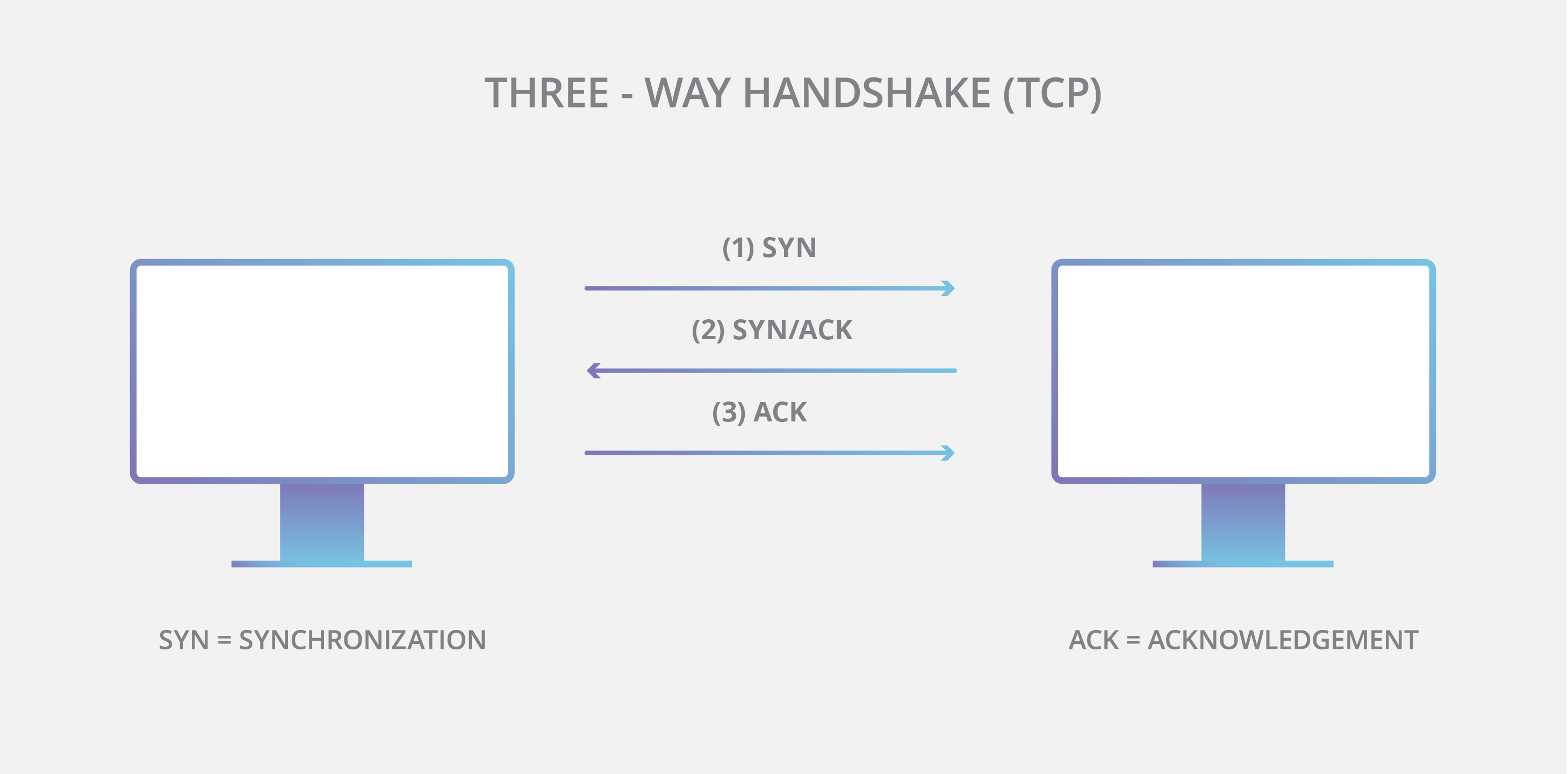
This uses a 3-way handshake to establish a connection. The sender sends a SYN packet, the receiver responds with SYN-ACK and then the sender sends an ACK back. This establishes a connection.
This means at least one full RTT (Round Trip Time) before any data can be sent.
The data transfer occurs as a stream of bytes with each byte having a sequence number. The receiver keeps sending back acknowledgements (ACKs) for the received bytes. If the sender doesn't receive an ACK within a certain time limit, it resends the packets. Hence, "reliable". The send rate is dependent on the ACKs received -- "flow control". If the network is congested, packets may be dropped, leading to retransmissions and reduced send rate -- "congestion control".
When the connection is no longer needed, it is terminated using a 4-way handshake. One side sends a FIN packet, the other side responds with an ACK, then sends its own FIN, and finally the first side responds with an ACK. For reading more about TCP, you can look into RFC 793.
This worked brilliantly and still does in most cases. But as the internet grew, we needed more speed, lower latency, and better packet handling, especially with mobile devices.
TCP has head-of-line blocking issues. If a packet is lost, all subsequent packets have to wait until the lost packet is retransmitted and received. This can lead to significant delays, especially in high-latency networks. Also, your connection would be tied to your IP address. Suppose you change from your home Wi-Fi to mobile data; your IP changes, and you have to establish a new connection.
There is another issue. TCP is deeply integrated into the OS kernels. This means any changes made to TCP would need OS updates. Now, this might seem trivial but there are a lot of devices out there and we would need change the server implementations, each mobile device OS, your PC OS, etc. separately. The data flow in the internet involves a lot of intermediate devices that would also need to understand these changes.
This would take decades to roll out any major changes. TCP surely has evolved over time but not as fast as we would want it to.
how does UDP work?
This is one of the simplest protocols out there. There are no handshakes here, no retransmissions, no ordering, no congestion or flow control. We just send the packets! Applications that use UDP have to deal with all of this themselves. Each UDP packet has:
Source Port
Destination Port
Length
Checksum
Data
That is just 8 bytes of headers compared to around 20 bytes in TCP headers. Hence, the OS doesn't wait for any acknowledgements or anything, it just sends the packets immediately. UDP treats data as discrete messages.
UDP supports broadcasting and multicasting, making it useful for gaming, streaming, etc. This also gives developers the freedom to implement their own custom congestion control, etc.
Since UDP doesn't enforce strict reliability or connection management, we can reimplement these behaviors in user space, allowing for faster iterative development.
QUIC
QUIC - Quick UDP Internet Connections
This is a transport layer network protocol designed by Google and later standardized by IETF. It is built on top of UDP and aims to provide features similar to TCP but with lower latency and better performance.
QUIC builds upon UDP to implement reliability, congestion control, multiplexing, and connection migration. It deeply integrates with TLS 1.3 for security.
HTTP/2.x also had TLS integrated, but it was separate from TCP, which increased the RTT.
Let's discuss these features in detail.
Connection Establishment
In HTTP/2.x, there was one round trip for the TCP handshake and another for the TLS handshake. This meant at least 2 RTTs before any data could be sent. Yes, there was also a version called TLS False Start that allowed sending data after the first round trip, but it was not widely adopted due to security concerns. This assumed that the client and server had previously connected and had cached information, allowing them to establish a new connection without a full handshake. So, practically, we still had to wait for 2 RTTs for the first connection and 1 RTT for subsequent connections.
The TLS handshake before TLS 1.3 looked like this:
Client ----> Server : ClientHello
Client <---- Server : ServerHello + Certificate + Key Exchange
Client ----> Server : Finished
Client <---- Server : Finished
In TLS 1.3, this was reduced to:
Client ----> Server : ClientHello
Client <---- Server : ServerHello + Certificate + Key Exchange + Finished
The question was: if we have connected securely before, why not use that cached info again? When you complete a TLS 1.3 or QUIC handshake for the first time, the server issues a session ticket or PSK (Pre-Shared Key) to the client. The client stores this information. When it wants to reconnect, it sends a ClientHello with the PSK. The server checks if it recognizes the PSK and if valid, it can skip the full handshake and proceed directly to secure communication. The first data packet from the server carries both handshake info and encrypted application data.
QUIC combines the TCP handshake and TLS handshake into a single process. So 1 RTT is enough to establish a secure connection and send data. If the client reconnects to the server, it can achieve 0-RTT since it has cached information from previous connections. This achieves true 0-RTT for subsequent connections.
0-RTT Cryptography
When a normal TLS 1.3 handshake happens, both client and server derive a master secret from the key exchange.
HKDF - HMAC Based Key Derivation Function: HKDF(handshake_secrets) -- RFC 5869 and RFC 8446.
From this master secret, the server creates a resumption secret and sends it to the client as part of the session ticket. The ticket is opaque to the client (the client cannot read its contents).
When the client wants to reconnect, it sends a ClientHello with the resumption secret. The server checks if it recognizes this secret and if valid, it derives the same master secret using the resumption secret. Both sides derive the early traffic keys using HKDF and the client can start sending 0-RTT encrypted data immediately. Meanwhile, the normal TLS handshake also continues in the background to establish fresh keys for future communication.
Here, the first data packet uses the older keys. If an attacker had recorded the previous session, they could replay this packet to the server—a replay attack.
Multiplexing and Streams
In TCP, if a packet is lost, all subsequent packets have to wait until the lost packet is retransmitted and received. This is called head-of-line blocking. This can lead to significant delays, especially in high-latency networks. There was no prioritization either, we could not send important files like CSS or JS earlier than others.
HTTP/2 tried to solve multiplexing at the application layer but it still used TCP underneath, so it was limited by TCPs (transport layer) Head of Line (HoL) Blocking.
QUIC solves this by using UDP as its foundation. Since UDP doesn’t guarantee order or reliability, QUIC can implement its own lightweight reliability and retransmission per stream.
In QUIC, there are multiple streams within a single connection. Each stream can be independently managed. If a packet in one stream is lost, it does not block the delivery of packets in other streams. Meaning, we can deliver important files without waiting for lost packets in other streams to be retransmitted. We get parallel, isolated data flows in the same UDP socket. Here, the packet loss handling is done per stream, not per connection.
Congestion Control and Loss Recovery
TCP works nice when managing congestion -- it slows down when it detects packet loss and speeds up when it doesn't. Now this is fine, but it does come with its flaws:
TCP has limited feedback. It relies on ACKs to determine delay. The retransmitted packets have the same byte range and sequence numbers, this makes it difficult to distinguish between new and old data -- causes uncertainty in RTT estimation and congestion control.
TCP's congestion control algorithms are not very adaptive to varying network conditions, especially in high-latency or lossy networks. This can lead to suboptimal performance.
Inflexible congestion control: TCP's congestion control mechanisms are built into the kernel, making it difficult to experiment with or deploy new algorithms without OS updates.
QUIC addresses these issues by having things in user-space. We can plugin in algorithms like BBR, CUBIC, Reno, etc. and tune things without OS updates. Rapid iteration for the win!
In QUIC, every packet has a unique packet number. This removes the ambiguity in distinguishing between new and old data. QUIC also uses ACK frames that can acknowledge multiple packets at once, and include ACK delay -- providing more granular feedback about which packets were received successfully and which were lost. This allows for more accurate RTT estimation and better congestion control.
Loss detection would be done with packet number gaps, timeouts, etc.
This results in more consistent latency and throughput, hence less jitter.
Connection Migration
TCP connections are tied to IP addresses. You would've seen this when you setup TcpStreams in any programming language. If your IP changes, you have to establish a new connection. This is a problem for mobile devices that switch between networks (WiFi to cellular). Establishing a new connection means doing the entire handshake process again along with the TLS handshake too!
In QUIC, connections are identified by Connection IDs rather than IPs. During the handshake, both the client and server exchange CIDs. Each endpoint can issue new CIDs to others for future path migration.
Suppose you change your IP addresses. The server sees this:
Old path: 192.168.1.22:50000 → 142.250.190.78:443
New path: 10.24.90.11:53012 → 142.250.190.78:443
The server will not trust this as this could a spoofed IP, old path might still be alive, congestion control metrics might be different, etc. So we need to validate it. When the client sends packets from a new IP address, the server doesn't trust it immediately. It sends a PATH_CHALLENGE frame to the new address. The client must respond with a PATH_RESPONSE frame. This verifies that the client controls the new address. Once verified, the server updates its routing to use the new IP for that connection.
Spoofed IP is something like you modify the IP address in the packet headers to appear as if they are going from someone else. You don't have the actual IP or anything you just wrote it. The server could easily validate by requesting an echo from the new IP. That's exactly what is going on here.
If you think about Man-in-the-Middle attacks, this could be a problem. An attacker could intercept your packets and send their own PATH_CHALLENGE to the server. The server would then send a PATH_RESPONSE to the attacker, who could then forward it to you. But this means the attacker is already intercepting and modifying traffic, no transport protocol can prevent that. You data is still safe though thanks to TLS 1.3.
TLS Integration
In TCP + TLS, they are separate layers. TCP handles the transport and TLS handles the security. This introduced additional RTTs and complexity.
in QUIC, most of the packet header and payload is encrypted using TLS 1.3. This means that QUIC packets are protected from eavesdropping and tampering. The encryption is done at the transport layer itself, reducing the number of round trips needed for secure communication. Since, a lot of the connection is encrypted, it is harder for middleboxes (firewalls, routers, etc.) to interfere with the connection. QUIC packets appear as regular UDP packets to these middleboxes, reducing the chances of connection issues due to misconfigured or outdated middleboxes. This resistance to protocol ossification is a key design goal of QUIC.
HTTP/3
This is the latest version of the HTTP protocol that runs over QUIC. It inherits all the benefits of the QUIC as described above. It uses the same request/response model as HTTP/1.x and HTTP/2 but with improved performance and security. So here we get:
Reduced Latency: 1-RTT connection establishment and 0-RTT for subsequent connections.
Multiplexing without HoL Blocking: Independent streams within a single connection.
Improved Congestion Control: More accurate RTT estimation and adaptive algorithms.
Connection Migration: Seamless switching between networks without dropping connections.
Built-in Security: TLS 1.3 integration for encrypted communication.
Drop-in Replacement: Designed to be a drop-in replacement for HTTP/2, making it easier to adopt.
QUIC and HTTP/3 don't really re-invent anything new, they are built upon existing concepts but with more granular fine-tuning.
At the time of writing this, HTTP/3 is supported by all major browsers and many CDNs and web servers. Around 30-40% of web traffic is now over HTTP/3.